Alter the kindle time
In this example we wish the boilers to kindle for 3 minutes if they have
been idle for any longer than 6 hours.
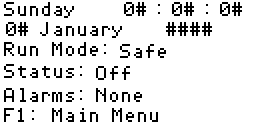
1. Main Display
Press F1 to go to the main menu.
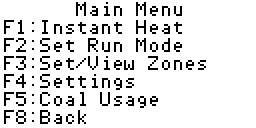
2. Main Menu
Press F4 to go to the settings screen.
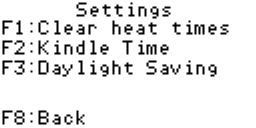
3. Settings
Press F2 to go to the kindle screen.
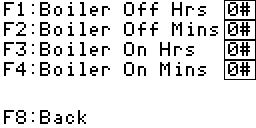
4. Kindle
We wish the boilers to remain idle for no longer than 6 hours and 0
minutes.
I. Press F1, boiler off hours.
II. Press the grey number key "6" followed by the enter key. The box to
the right of the label "F1: Boiler Off Hrs" will now read "06".
III. Press F2, boiler off minutes.
IV. Press the grey number key "0" followed by the enter key. The box to
the right of the label "F2: Boiler Off Mins" will now read "00".
V. Press F3, boiler on hours.
VI. Press the grey number key "0" followed by the enter key. The box to
the right of the label "F3: Boiler On Hrs" will now read "00".
VII. Press F4, boiler on minutes.
VIII. Press the grey number key "3" followed by the enter key. The box to
the right of the label "F4: Boiler On Mins" will now read "03".
IX. Done, you can now press the F8 key three times to return to the main
display.