Alter Daylight Saving Time
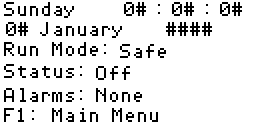
1. Main Display
Press F1 to go to the main menu.
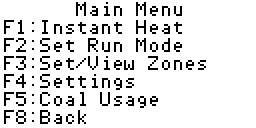
2. Main Menu
Press F4 to go to the settings screen.
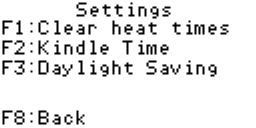
3. Settings
Press F3 to go to the daylight saving screen.
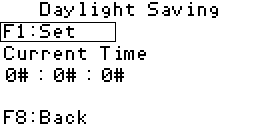
4. Daylight Saving
If daylight saving is not currently set then the label will read
"F1: Set", as it does in the image to the right. If daylight saving is
set then the label will read "F1: Remove". Pressing the F1 key will
carry out the instruction to the right of the label.
The current time, as perceived by the plc will be displayed below the
"Current Time" label. Setting daylight saving will add one hour to the
current time, while conversly removing daylight saving will subtract one
hour.
You can now press the F8 key three times to return to the main display.