Set Or View Times For Currently Selected Zone
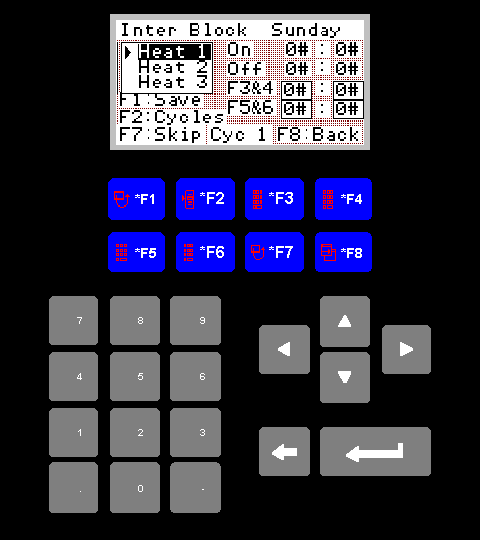
Set/View Times Screen
The purpose of this screen is to allow the operator to set or view any
of the five on and off times for each of the zones, on any given day.
1. Title
The top row of the display will tell you the zone that you are currently
setting/viewing, and for which day.
2. Cycle Selection
The box directly below the title will allow you to select the cycle you
wish to modify or view, Heat 1, Heat 2 etc. To change your selection
press the grey up or down arrows.
3. On Label
The two boxes to the right of the "On" label will display the current on
hour and on minute for the selected cycle.
4. Off Label
The two boxes to the right of the "Off" label will display the current
off hour and off minute for the selected cycle.
5. F1 Save
Pressing F1 will update the plc with any changes that you have made to
the F3, F4, F5, and F6 input areas.
6. F2 Cycles
This key is now redundent.
7. F3
Pressing F3 will take you to an input screen where you can enter the hour
at which you would like the current cycle to start heating.
8. F4
Pressing F4 will take you to an input screen where you can enter the
minute at which you would like the current cycle to start heating.
9. F5
Pressing F5 will take you to an input screen where you can enter the hour
at which you would like the current cycle to stop heating.
10. F6
Pressing F6 will take you to an input screen where you can enter the
minute at which you would like the current cycle to stop heating.
11. F7 Skip
Pressing F7 will cause the current cycle to be skipped once, after which
it will revert to it's normal running time. Pressing F7 when a cycle is
already skipped will cause that cycle to return to it's normal running
times.
12. F8
Returns you to the previous screen.