Start Or Stop Instant Heating
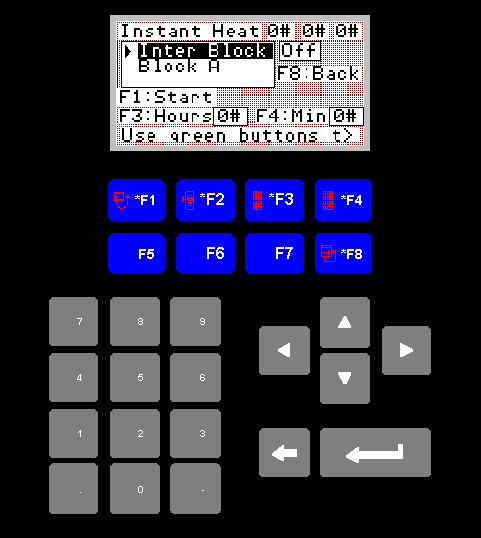
Start/Stop Instant Screen
This screen will allow you to start or stop the instant heating. It will
also display the time the instant heat has remaining to run.
1. Instant Heat Label
The numbers on the top row, opposite the label "Instant Heat", display
the amount of time remaing before the instant heat cycle will disable
itself.
2. Zone Selection
The box directly below the title will allow you to select any zone. When
a zone is selected the box to the right of the selected zone will display
"Off" or "On" to indicate whether the selected zone is scheduled for
instant heat. The zone selection buttons, 22 to 31, mounted on the front
of the control cabnet will also be illuminated if a given zone is to be
heated via instant heating. The On Off text is a check against faulty
or blown lamps in the selection buttons.
3. F1 Start
If there are positive values in the F3 and/or F4 selection fields, then
pressing F1 will start heating for the selected zones
4. F3 Hours
Pressing F3 will take you to an input screen where you can enter the
number of hours you would like the instant heating to run.
5. F4
Pressing F4 will take you to an input screen where you can enter the
number of minutes you would like the instant heating to run.
6. F8
Returns you to the main menu.
7. Zone Selection
The zones you wish to heat via instant heating can be selected while
you are in this screen. To select/deselect zones, push the zone setting
buttons on the front of the control cabnet. The buttons are labeled 22
to 31 on the controls page of this document. When the zone is selected
the button will become illuminated.