Scheduled Heating
In the following example we are going to schedule the Inter Block to
heat on Sunday. We are going to set three seperate times for the same
day, between 6:30am and 9am, again between 1pm and 4:30pm, and again
between 7pm and 9pm. All other blocks are set in exactly the same manner,
other then the block, and day selections, as will become obvious.
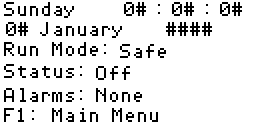
1. Main Display
Press F1 to go to the main menu.
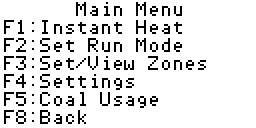
2. Main Menu
Press F3 to go to the zone selection screen.
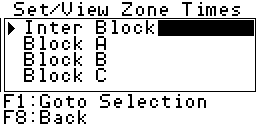
3. Select Zones
I. Press the grey up down arrows, as shown in the
"Select Zones"
screen, to select the desired zone. In this case we wish to set the time
for the Inter Block zone which is already selected.
II. Press the F1 key to go to the select days screen.
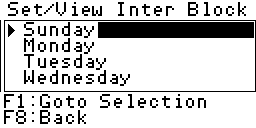
4. Select Days
I. Press the grey up down arrows, as shown in the
"Select Days"
screen, to select the desired day. In this case we wish to set the time
for Sunday which is already selected.
II. Press the F1 key to go to the select times screen.
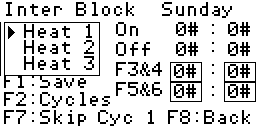
4. Select Times
I. The first time we wish to set is to start heating at 6:30am and stop at
9am. Since Heat 1 is already selected we can enter the times straight
away.
A. Press the F3 key.
B. Press the grey number key "6" followed by the enter key.
C. Press the F4 key.
D. Press the grey number key "3", then the grey number key "0",
followed by the enter key. The boxes to the right of the label
"F3&4" will now read 06:30.
E. Press the F5 key.
F. Press the grey number key "9" followed by the enter key.
G. Press the F6 key.
H. Press the grey number key "0" followed by the enter key. The boxes
to the right of the label "F5&6" will now read 09:00
I. Press the F1 key to save the times. The box to the right of the
label "On" will read 06:30, and the box to the right of the label
"Off" will read 09:00. Our first time is now set.
II. The second time we wish to set is to start heating at 1pm and stop at
4:30pm.
A. Press the grey down arrow key to select "Heat 2".
B. Press the F3 key.
C. Press the grey number key "1", then the grey number key "3",
followed by the enter key.
C. Press the F4 key.
D. Press the grey number key "0" followed by the enter key. The boxes
to the right of the label "F3&4" will now read 13:00.
E. Press the F5 key.
F. Press the grey number key "1" then the grey number key "6",
followed by the enter key.
G. Press the F6 key.
H. Press the grey number key "3" then the grey number key "0",
followed by the enter key. The boxes to the right of the label "F5&6"
will now read 16:30
I. Press the F1 key to save the times. The box to the right of the
label "On" will read 13:00, and the box to the right of the label
"Off" will read 16:30. Our second time is now set.
III. The third time we wish to set is to start heating at 7pm and stop at
9pm.
A. Press the grey down arrow key to select "Heat 3".
B. Press the F3 key.
C. Press the grey number key "1", then the grey number key "9",
followed by the enter key.
C. Press the F4 key.
D. Press the grey number key "0" followed by the enter key. The boxes
to the right of the label "F3&4" will now read 19:00.
E. Press the F5 key.
F. Press the grey number key "2" then the grey number key "1",
followed by the enter key.
G. Press the F6 key.
H. Press the grey number key "0" followed by the enter key. The boxes
to the right of the label "F5&6" will now read 21:00
I. Press the F1 key to save the times. The box to the right of the
label "On" will read 19:00, and the box to the right of the label
"Off" will read 21:00. Our third time is now set.
IV. Our work here is done. You may now press the F8 key three times to
return to the main screen.