Starting The Instant Heating
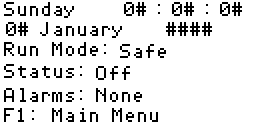
1. Main Display
Press F1 to go to the main menu.
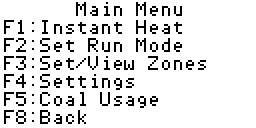
2. Main Menu
Press F1 to go to the instant heating screen.
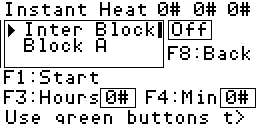
3. Instant Heat
You can now select or deselect the zones by pushing the green zone
selection buttons, numbered 22 to 31 inclusive (See
"Controls Layout"
under the General heading).
The zone will be selected to run when the button becomes illuminated. If
one of the buttons refuses to illuminate select that zone by pushing the
grey up down buttons on the
panelview
itself. When the zone becomes highlighted in the box, check to
see if the label to the right of the selected zone changes between "Off"
and "On" when the green zone button is pushed. If this label changes then
you have a blown or faulty lamp in the zone selection button. If the
label does not change, please contact your current service provider, as
you will not be able to select that zone for instant heat.
4. Set The Hours
I. Press F3
II. Press the grey number buttons on the panelview to select the number
of hours you wish the instant heating to run for.
III. Press the enter key.
5. Set The Minutes
I. Press F4
II. Press the grey number buttons on the panelview to select the number
of minutes you wish the instant heating to run for.
III. Press the enter key.
6. Start Heating
Press F1. The boilers and school circulating pump will start, and the
time counter in the top right hand corner of the screen will begin to
count down.
You may now press F8 twice to return to the main display screen, or you
may wish to leave this screen up until the instant heat has timed out.
7. Trouble Shooting
If the boilers or circulating pump do not start, you can check the
following items:
I. Are either the hours or minutes above zero?
II. Have you selected at least one zone to heat?
III. Is the school circulating pump warning light (lamp 5 in the
"Controls Layout"
section) illuminated? If this is the case, contact your current
service provider.
IV. Are the boilers over temperature? In this case the circulating pump
should be running, but not the boilers. If this is so you may leave the
instant heat running as the boilers will start when the water temperature
has dropped.
Stopping The Instant Heating
1. Main Display
Press F1 to go to the main menu.
2. Main Menu
Press F1 to go to the instant heating screen.
3. Instant Heat
Press F1, the boilers and school circulating pump will stop.
You may now press F8 twice to return to the main display screen.
4. Trouble Shooting
If the boilers or circulating pump do not stop, you can check the
following items:
I. Ensure that the boilers are not actually scheduled to run now.