Main Display
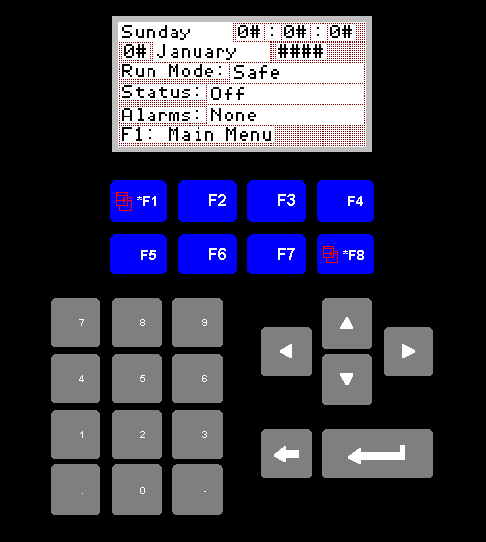
Panelview Main Screen
This screen is the screen that will normally be displayed. It is
designed to give the operator a quick overview of the current status
of the system.
1. Date And Time
The current time and date is displayed on the first two rows.
2. Run Mode
The current running mode is displayed on the next row. Mode
setting will be covered later in the document.
The run modes are:
I. Safe:
The run modes are:
I. Safe:
In safe mode everything will be shut down.
II. Normal:
The normal running mode.
III. Holiday:
In this mode the boiler will kindle only for the
preset kindle times. Nothing else will run.
IV. Error:
In this mode nothing will be running. Error handling
will be covered later in the document.
3. Status
The status is an indication of what the boiler is doing right now. It's
possible states are:
I. Off:
I. Off:
Nothing is running, or the boiler control switch has been set to,
manual or kindle.
II. Waiting:
The system is ready and waiting for a signal to run.
III. Disipate:
The system has gone over temperature and is now disipating the excess
heat. The boilers will be shut down, all valves will be open, and
both circulating pumps will be running.
IV. Kindle:
The boiler is kindling. The boiler should only run for the time that
has been set in the kindle screen. It will then shut down, and
remain off until the next kindle cycle, or until another call for
heat is recieved.
V. Running:
The boiler is running in normal mode.
VI. Instant:
The system has been asked to supply instant heat. Instant heat
setting will be covered later in the document.
VII. Frost:
The system is running in frost protection mode. The boilers will be
shut down, unless an area is calling for heat, and all valves will be
open, with both circulating pumps running.
VIII. Run On:
When the system has just shut down from a running state, there can
be a lot of residual heat in the boilers. This will cause the system
to go into "run on" to avoid going over temperature.
In this state:
IX. Error:
In this state:
The boilers will be shut down.
If the heating mode switch (switch 3 control panel) is set to
"Mode D" the pool valve will remain closed. In all other cases
the valve will be open.
All block valves will be open.
Both circulating pumps will be running.
An error has occured in the system. Error handling will be covered
later in the document.
4. Alarms
This will be set to one of the three following states:
I. None:
I. None:
The normal situation.
II. F8 To View:
This is indicating that there is an alarm situation.
Press the F8 key to view the current alarms.
III. Error:
In this instance it will be necessary to contact your
current service provider.
5. F1 Main Menu
Press F1 to view the main menu screen.